


LanTu: Your Professional Server Chassis manufacturer!
Jiaxing Lantu Chassis Co., Ltd. is located in Haiyan County, Jiaxing City, Zhejiang Province. It is a company engaged in the design, production and professional production of precision metal molds: aluminum shells, aluminum profile shells, communication chassis chassis, 19-inch chassis, non-standard chassis, hardware for The main well-known enterprises.
Rich Experience
Jiaxing Lantu Chassis Co., Ltd. is a company engaged in the design, production and professional production of precision metal molds.
Customizable Services
The company can also produce suitable products according to the customer's size, drawings, and physical requirements, such as modeling design, structural design and other technical means.
R & D Team
The company has professional R & D capabilities and technical level ranking in the top domestic R & D team.
Wide Range of Applications
It is widely used in electronics, instruments, meters, industrial control, communications, medicine, aerospace and other fields.
A server chassis is a metal structure that is used to house or physically assemble servers in various different form factors. A server chassis makes it possible to put multiple servers and other storage and peripheral equipment in a single physical body. A server chassis can also be called a server casing or server case.

Model Number: 3U
Place of Origin: jiaxing, Zhejiang, china
Package Type: Paper Box
Supply Ability: 5000 Piece/Pieces per Week
MOQ: 10

Model Number: 180-1
Place of Origin: jiaxing, Zhejiang, china
Package Type: Paper Box
Supply Ability: 5000 Piece/Pieces per Week
MOQ: 10

Model Number: 3U
Place of Origin: jiaxing, Zhejiang, china
Package Type: Paper Box
Supply Ability: 5000 Piece/Pieces per Week
MOQ: 10

Model Number: LT-30
Place of Origin: jiaxing, Zhejiang, china
Package Type: Paper Box
Supply Ability: 5000 Piece/Pieces per Week
MOQ: 100

Model Number: LT-17
Place of Origin: jiaxing, Zhejiang, china
Package Type: Paper Box
Supply Ability: 5000 Piece/Pieces per Week

Model Number: LT-18
Place of Origin: jiaxing, Zhejiang, china
Package Type: Paper Box
Supply Ability: 5000 Piece/Pieces per Week
MOQ: 100

Model Number: LT-40
Place of Origin: jiaxing, Zhejiang, china
Package Type: Paper Box
Supply Ability: 5000 Piece/Pieces per Week
MOQ: 100

Model Number: LT-84
Place of Origin: jiaxing, Zhejiang, china
Package Type: Paper Box
Supply Ability: 5000 Piece/Pieces per Week
MOQ: 100
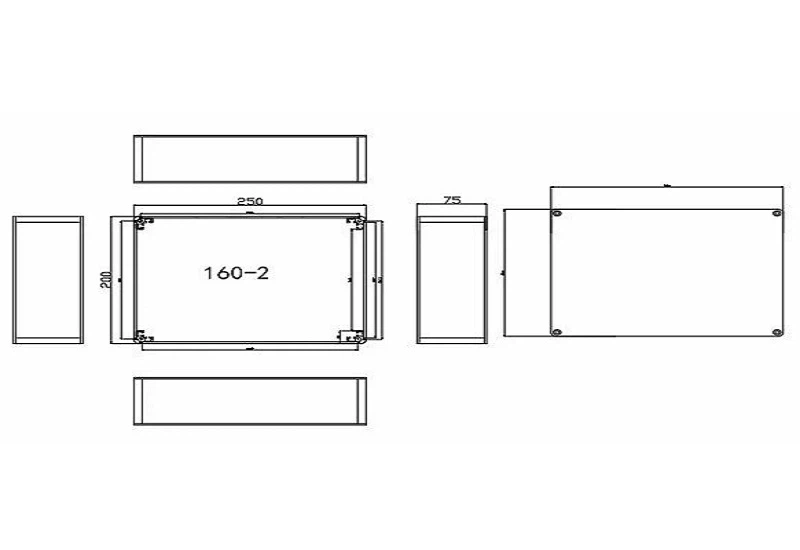
Model Number: 160-2
Place of Origin: jiaxing, Zhejiang, china
Package Type: Paper Box
Supply Ability: 5000 Piece/Pieces per Week
MOQ: 10
Better Performance
Proper airflow is key to the optimal performance of your servers. Stacking servers in a single place can bring huge risks due to overheating. When you choose the right server chassis, you can enable your servers to run at optimal levels by making the most of your airflow management. Since server chassis come in different sizes and designs, you can easily remove empty shelves or cover them with blanking panels to boost airflow. However, in order to make this work, you should also ensure that you are getting server chassis that are made out of quality and durable materials.
Easy to Maintain
Data center maintenance is essential for keeping your facility running at full capacity. Server chassis make maintenance a lot easier, as their shelves can easily slide out. Technicians can also easily handle all the wires and bundle them together. Most server chassis are also equipped with wheels so that you can move them around. Moreover, as everything is located in an organized fashion with a server chassis, you can easily access and resolve problems when they occur.
Greater Security
Security is imperative in data centers. server chassis use locked panels that can help keep unauthorized people out and your servers safe. Different server chassis come with different locking systems so ensure that you consider which locking system works best for your requirements. Moreover, since sever racks are very sturdy, server chassis can prevent potential damage to expensive equipment as it is safely stored on the rack.
Provides Room To Grow
As data center equipment evolves, data center managers may struggle to keep up. However, choosing the right server chassis and other such data center products can allow you to easily scale up your facility as needed. Many server chassis feature designs that allow for expansion and allow for the additional weight of data center storage equipment. Racks can also easily be changed to accommodate new requirements. There are also various accessories that can be added to your server chassis to accommodate any new changes.
Compatible with a Variety of Equipment
Data centers have a lot of equipment that is used for a variety of applications. A server chassis is a product that is versatile and very compatible with a lot of different types of equipment, even if you have servers and switches from different manufacturers. This makes this piece of equipment quite cost-effective as well, as you will not need to purchase different racks to accommodate equipment from a single vendor. The ability to customize your server chassis also adds to its compatibility with any and all of your equipment.
Better Organisation of Space
Choosing the right server chassis for your data center can help you to optimize your space a lot more effectively, giving both order and functionality to this space. This is especially true if you purchase customized server chassis, as the storage solution will be perfectly designed to fit all your equipment. This means that there will be no wasted space and equipment can remain snuggly fit without the risk of moving around or getting misplaced. Server chassis also ensure better cable management.
Types of Server Chassis
Server Rack Cabinets (Server Rack Enclosures)
Server cabinets are fully enclosed racks with doors and side panels that can be locked, providing an added layer of security. Their robust design offers enhanced protection for the equipment, making them a staple in data centers or locations where safeguarding equipment is paramount.
Open-Frame Racks (2-post and 4-post racks)
Open-Frame Racks (2 post and 4 post racks) are characterized by their lack of doors or side panels, offering fast and unimpeded access to equipment and cabling. Their open design promotes efficient airflow, making them suitable for secure, well-ventilated environments.
Wall-Mounted Racks
Designed to be affixed directly onto walls, these racks are compact and secure, optimizing space usage in areas with limited floor availability. They are prevalent in network closets and small spaces.
Low-Profile Racks
These racks are smaller and designed to fit in non-IT environments where space is constrained, such as classrooms, retail locations, offices, and healthcare facilities.
Industrial-Grade Racks
Built for resilience and durability, these racks are tailored for specific types of equipment or challenging environments like factories, outdoor settings, or hazardous locations.
Portable Racks
Equipped with casters for mobility, these racks are designed for scenarios where equipment needs to be mobile, offering flexibility and convenience for transient or mobile setups.
Vertical-Mount Racks
These are wall-mounted racks with a vertical orientation, minimizing depth and maximizing space efficiency. They are optimal for back offices, wiring closets, or retail locations with limited horizontal space.
Sound-Proof Server Racks
Specifically designed to mitigate IT equipment's noise, such as recording studios, offices, or residential areas, are used to maintain a quiet environment.
Equipment Organization
Server chassis offer a structured environment for arranging IT equipment in a neat and organized manner. This helps in maximizing space utilization and improving accessibility for maintenance and troubleshooting tasks.
Space Optimization
By vertically stacking multiple servers and other hardware components in a compact enclosure, server chassiss enable efficient use of available floor space. This is particularly beneficial in environments where space is limited, such as data centers or server rooms.
Cooling and Airflow Management
Server chassis are designed with airflow patterns and ventilation systems to ensure proper cooling of IT equipment. They feature perforated doors, side panels, and adjustable mounting rails to facilitate airflow and prevent overheating of servers and other devices.
Cable Management
Server chassis include built-in cable management features such as cable trays, routing channels, and cable ties to organize and route cables effectively. This helps in minimizing cable clutter, reducing the risk of cable damage, and simplifying maintenance tasks.
Equipment Protection
Server chassis provide a secure and stable enclosure for housing valuable IT assets, protecting them from physical damage, dust, and unauthorized access. Racks may include locking doors, side panels, and security locks to safeguard equipment from theft or tampering.

To determine the server chassis size, consider what kind of equipment will be placed in the server chassis and how many. Standard-sized racks are usually selected because standard-sized equipment easily integrates in the rack.
The server chassis depth is the distance of the front rail to the back of the back rail. Not only is it crucial to find out the size of the server chassis component, IT managers also need to account for the wire connections and airflow required.
The Rack Unit (U or RU) is the unit of measurement used to define the vertical space available in an equipment rack. It is applied to the server chassis as well as the devices they hold. It is standardized as multiples of 1.75 inches (44.45 mm) or one rack unit or "U". Most racks are sold in the 42U form, which means a single rack can hold forty-two (42) 1U devices, or any combination of 1U, 2U, 3U or other rack unit heights that add up to 42 or less.
Frame: The frame forms the main structure of the server chassis, providing a sturdy foundation to hold all the components securely in place.
Rack Units (U): The server chassis's height is measured in rack units (U), where one U is equal to 1.75 inches (44.45 mm). Servers and other devices are designed to fit into specific U-sized slots within the rack.
Rails: These horizontal bars run along the sides of the server chassis, facilitating easy sliding and mounting of equipment.
Cage Nuts and Screws: These are the primary fasteners to secure servers and other devices to the vertical posts of the rack.
Cooling Mechanisms: Server chassis often feature built-in cooling systems, such as fans and air vents (typically located at the top), to regulate and dissipate heat the enclosed equipment generates.
Power Distribution Units (PDUs): These units manage power distribution to the devices within the rack, helping to avoid power overload and providing remote power control. Some more modern server chassis come with built-in uninterruptible power supply (UPS).
Cable Management: Cable organizers and management arms keep the cables within the rack neat and organized, ensuring easy maintenance and minimizing airflow obstruction.
Blank Panels: These fillers cover unused rack space, promoting proper airflow and maintaining a clean and organized appearance.
Front and Rear Doors: Nowadays, server chassis typically have front and rear doors with locks for security.
How Does Server Chassis Work?
Rack Power Supply
The backbone of a data center's operation, the power supply system ensures uninterrupted and reliable power distribution to the server chassis. Multiple independent power sources, uninterruptible power supplies (UPS), and backup generators are employed to maintain power continuity and safeguard against outages.
Cooling Systems
To prevent hardware overheating, precision air conditioning units and rack cooling systems are deployed within the server room. These systems maintain optimal temperature and humidity levels to ensure the efficient operation and longevity of IT equipment housed within the server chassis.
Security Measures
Server chassis are equipped with robust security systems to safeguard against unauthorized access and protect the confidentiality of stored data. Access control systems, video surveillance, fire alarms, and emergency fire suppression systems are implemented to mitigate security risks and prevent potential threats.
Data Transfer Infrastructure
Reliable and high-speed data transfer capabilities are essential for seamless communication and connectivity within the server room. Dedicated channels and redundant network connections, both within the data center and to external networks, ensure stable data transmission and minimize latency.
Monitoring and Dispatching
Continuous monitoring and management of all data center systems are facilitated by dispatching and monitoring systems. These systems track the performance and status of critical infrastructure components, allowing for proactive identification and resolution of issues to maintain optimal operational efficiency.
The Role of Server Chassis in Data Centers
Ensuring Cooling and Airflow
Servers work non-stop and generate a lot of heat. If this heat is not managed properly, it can lead to equipment failure. server chassis are designed to promote airflow, helping to keep the equipment cool. They have perforated doors and panels that allow air to flow through the rack, carrying away the heat. In a well-designed data center, the layout of the racks is planned to maximize cooling efficiency, often using hot aisle/cold aisle arrangements. This setup ensures that cool air reaches the servers and the hot air is efficiently expelled.
Power Distribution and Cable Management:
Imagine the number of cables and power cords a single server needs. Now multiply that by the hundreds or thousands of servers in a data center. It sounds like a recipe for chaos, but server chassis keep it all under control. They have features for managing and organizing cables and power distribution units (PDUs). This keeps the area tidy and reduces the risk of accidents or unplugging something important while moving around.
Security and Accessibility
Data centers hold sensitive information, and security is a top priority. server chassis often have lockable doors and panels to protect the equipment from unauthorized access. At the same time, they are designed to be easily accessible to authorized personnel for maintenance or upgrades, ensuring that any necessary work can be done quickly and without hassle.
Enhancing Scalability and Flexibility
As businesses grow and technology evolves, the needs of a data center can change rapidly. server chassis are designed with scalability in mind, allowing for easy expansion or reconfiguration. This means when a company needs to add more servers or upgrade existing ones, it can be done without a major overhaul of the entire system. Modular designs and adjustable mounting rails ensure that server chassis can accommodate equipment of different sizes and shapes, providing flexibility and future-proofing the data center.
The Role in Disaster Prevention
In a world where data is one of the most valuable assets, protecting it from disasters is crucial. server chassis play an unexpected yet vital role in this aspect. They are engineered to be robust and stable, ensuring the equipment remains secure even in adverse conditions. Features such as seismic bracing make racks resistant to vibrations and earthquakes.
Streamlining Maintenance and Operations
Routine maintenance is a part of the life cycle of any technological equipment. server chassis simplify this process. With features like slide-out shelves and swing doors, technicians can access the equipment easily. This minimizes the downtime during maintenance or upgrades.
Contribution to Energy Efficiency
Data centers consume significant energy, and making them more energy-efficient is a constant goal. server chassis contribute to this by optimizing airflow and reducing the cooling requirements. When servers are arranged systematically, cooling systems can work more efficiently, saving energy significantly.
The Aesthetic and Professional Appeal
Lastly, while functionality is the primary concern, server chassis' aesthetic and professional appeal can't be ignored. A well-organized, clean, and professional-looking data center reflects positively on the company. It shows a commitment to quality and reliability, which can be crucial for businesses that host client data or provide IT services.
Regular Cleaning: A Spotless Sanctuary for Servers
Just like any piece of equipment, server chassis accumulate dust and debris over time. Regular cleaning is a fundamental step in server chassis maintenance. Dust can obstruct airflow, leading to overheating and reduced performance. Use a can of compressed air to blow away dust from the vents, and invest in anti-static wipes to clean surfaces. Ensure that the surrounding area is clean to minimize the risk of contaminants entering the server room.
Temperature Control: A Cool Environment for Optimal Performance
Servers generate heat and maintaining an optimal temperature is crucial for their performance and longevity. Install temperature monitoring systems and fan trays in India to keep track of fluctuations. Ensure that the server room is adequately ventilated and consider investing in cooling systems such as air conditioning or specialized server room cooling units. Keeping the temperature within the recommended range prevents overheating, ensuring that your servers operate at peak efficiency.
Organized Cable Management: Untangle for Efficiency
Messy cables not only look unprofessional but can also lead to airflow restrictions and difficulty in troubleshooting. Use cable ties, Velcro straps or cable organizers to bundle and route cables neatly. Well-organized cables not only improve airflow but also make it easier to identify and replace faulty components, reducing downtime.
Uninterruptible Power Supply (UPS) Checks: Safeguarding Against Power Outages
Power outages can wreak havoc on servers and data integrity. Regularly check the status of your UPS units to ensure they are in good working condition. Verify the battery health, run self-tests periodically, and replace batteries as needed. A reliable UPS system safeguards your servers against power fluctuations and outages, providing enough time for a graceful shutdown in case of an extended power loss.
Regular Inspections: The Key to Proactive Maintenance
Perform routine inspections of your server and networking racks in India to identify potential issues before they escalate. Check for loose or damaged components, frayed cables and any signs of wear and tear. Inspect the power distribution units in India (PDUs), ensuring that they are functioning correctly. Regular inspections allow you to address issues promptly, minimizing the risk of unexpected failures and downtime.
Security Measures: Guarding Against Unauthorized Access
Server rooms house sensitive and valuable data, making security a top priority. Restrict access to authorized personnel only, and implement security measures such as rack security in India. A secure server infrastructure not only protects your data but also ensures the physical safety of your server chassis.
Documentation: The Blueprint for Efficient Maintenance
Maintaining detailed documentation of your server chassis setup is essential. Document the layout, hardware configurations and any modifications made over time. This documentation serves as a valuable resource for troubleshooting, upgrades and future expansions. It streamlines the maintenance process, making it easier for technicians to identify and resolve issues quickly.
Ultimate FAQ Guide to Server Chassis
Hot Tags: server chassis, China server chassis manufacturers, suppliers, factory, Power Supply Metal Enclosures, 12 bay server case, 1ru server chassis, best 4u server chassis, home server case, Headphone Amplifer Cases


